Python Basics III#
Welcome to Python Basics III — the final Python foundations lecture before numerical methods!
In this notebook, we’ll cover:
NumPy Arrays In-Depth — The foundation of scientific computing in Python
Advanced Matplotlib — Creating publication-quality figures
Vectorization & Performance — Writing fast numerical code
Functions as Arguments — Preparing for numerical methods
Physics Applications — Putting it all together
By the end of this lecture, you’ll be ready to implement numerical integration, differentiation, and other computational methods.
I. NumPy Arrays In-Depth#
NumPy (Numerical Python) is the foundation of scientific computing in Python. The ndarray (n-dimensional array) is its core data structure.
Why NumPy?
Fast: Operations are implemented in C, much faster than Python loops
Convenient: Mathematical operations work element-wise
Memory efficient: Stores data in contiguous memory blocks
Universal: Used by virtually all scientific Python libraries
import numpy as np
import matplotlib.pyplot as plt

# Check version
print(f"NumPy version: {np.__version__}")
NumPy version: 2.0.2
1. Creating Arrays#
There are many ways to create NumPy arrays:
# From a Python list
a = np.array([1, 2, 3, 4, 5], float)
print(f"From list: {a}")
print(f"Type: {type(a)}")
print(f"Shape: {a.shape}")
print(f"Data type: {a.dtype}")
From list: [1. 2. 3. 4. 5.]
Type: <class 'numpy.ndarray'>
Shape: (5,)
Data type: float64
# Zeros, ones, and empty arrays
zeros = np.zeros(5)          # 5 zeros
ones = np.ones(5)            # 5 ones
full = np.full(5, 3.14)      # 5 copies of 3.14

print(f"Zeros: {zeros}")
print(f"Ones: {ones}")
print(f"Full: {full}")
Zeros: [0. 0. 0. 0. 0.]
Ones: [1. 1. 1. 1. 1.]
Full: [3.14 3.14 3.14 3.14 3.14]
# linspace and arange - VERY important for physics!

# linspace: N evenly spaced points between start and end (inclusive)
x1 = np.linspace(0, 10, 5)   # 5 points from 0 to 10
print(f"linspace(0, 10, 5): {x1}")

# arange: points with fixed step (like range, but for floats)
x2 = np.arange(0, 10, 2)     # start=0, stop=10, step=2
print(f"arange(0, 10, 2): {x2}")

### range(0,10)

# Common use: time array for simulations
t = np.linspace(0, 1, 101)   # 0 to 1 second, 101 points (dt = 0.01)
print(f"\nTime array: {t[:10]}... (first 10 of {len(t)} points)")
linspace(0, 10, 5): [ 0.   2.5  5.   7.5 10. ]
arange(0, 10, 2): [0 2 4 6 8]

Time array: [0.   0.01 0.02 0.03 0.04 0.05 0.06 0.07 0.08 0.09]... (first 10 of 101 points)
# Random arrays - useful for Monte Carlo simulations
np.random.seed(3)  # For reproducibility

uniform = np.random.random(5)           # Uniform [0, 1)
normal = np.random.randn(5)             # Standard normal (mean=0, std=1)
integers = np.random.randint(1, 10, 5)  # Random integers [1, 10)

print(f"Uniform [0,1): {uniform}")
print(f"Normal: {normal}")
print(f"Integers [1,10): {integers}")
Uniform [0,1): [0.5507979  0.70814782 0.29090474 0.51082761 0.89294695]
Normal: [-0.46004212 -0.05792084  2.07757414 -0.60131248  0.93923639]
Integers [1,10): [3 2 4 6 9]
2. Multi-dimensional Arrays#
NumPy arrays can have any number of dimensions. 2D arrays are like matrices.
# 2D array (matrix)
matrix = np.array([[1, 2, 3],
                   [4, 5, 6],
                   [7, 8, 9]])

print("Matrix:")
print(matrix)
print(f"Shape: {matrix.shape}")  # (rows, columns)
print(f"Dimensions: {matrix.ndim}")
print(f"Total elements: {matrix.size}")
Matrix:
[[1 2 3]
 [4 5 6]
 [7 8 9]]
Shape: (3, 3)
Dimensions: 2
Total elements: 9
# Creating 2D arrays
zeros_2d = np.zeros((3, 4))       # 3 rows, 4 columns
ones_2d = np.ones((2, 5))
identity = np.eye(3)              # 3x3 identity matrix

print("Zeros (3x4):")
print(zeros_2d)

print (ones_2d)

print("\nIdentity (3x3):")
print(identity)
Zeros (3x4):
[[0. 0. 0. 0.]
 [0. 0. 0. 0.]
 [0. 0. 0. 0.]]
[[1. 1. 1. 1. 1.]
 [1. 1. 1. 1. 1.]]

Identity (3x3):
[[1. 0. 0.]
 [0. 1. 0.]
 [0. 0. 1.]]
3. Array Operations#
NumPy operations work element-wise by default. This is incredibly powerful!
# Element-wise operations
a = np.array([1, 2, 3, 4, 5])
b = np.array([10, 20, 30, 40, 50])

print(f"a = {a}")
print(f"b = {b}")
print(f"a + b = {a + b}")    # Element-wise addition
print(f"a * b = {a * b}")    # Element-wise multiplication
print(f"a ** 2 = {a ** 2}")  # Square each element
print(f"b / a = {b / a}")    # Element-wise division


matrix = np.array([[1, 2, 3],
                   [4, 5, 6],
                   [7, 8, 9]])

matrix2 = np.array([[10, 20, 3],
                   [4, 10, 6],
                   [4, 1, 9]])

print (matrix * matrix2)
a = [1 2 3 4 5]
b = [10 20 30 40 50]
a + b = [11 22 33 44 55]
a * b = [ 10  40  90 160 250]
a ** 2 = [ 1  4  9 16 25]
b / a = [10. 10. 10. 10. 10.]
[[10 40  9]
 [16 50 36]
 [28  8 81]]
Broadcasting#
NumPy can operate on arrays of different shapes through broadcasting:
# Scalar + array: scalar is "broadcast" to match array shape
a = np.array([1, 2, 3, 4, 5])

print(f"a = {a}")
print(f"a + 10 = {a + 10}")     # Add 10 to each element
print(f"a * 2 = {a * 2}")       # Multiply each by 2
print(f"a / 2 = {a / 2}")       # Divide each by 2

# Physics example: convert Celsius to Fahrenheit
celsius = np.array([0, 20, 37, 100])
fahrenheit = celsius * 9/5 + 32
print(f"\nCelsius: {celsius}")
print(f"Fahrenheit: {fahrenheit}")

a_list = [1, 2, 3, 4, 5]
print (a_list)
print (a_list + [10])
a = [1 2 3 4 5]
a + 10 = [11 12 13 14 15]
a * 2 = [ 2  4  6  8 10]
a / 2 = [0.5 1.  1.5 2.  2.5]

Celsius: [  0  20  37 100]
Fahrenheit: [ 32.   68.   98.6 212. ]
[1, 2, 3, 4, 5]
[1, 2, 3, 4, 5, 10]
Universal Functions (ufuncs)#
NumPy provides fast mathematical functions that operate on arrays:
        x = np.linspace(0, 2*np.pi, 5)
        print(f"x = {x}")

        # NumPy functions work element-wise on arrays.
        print(f"sin(x) = {np.sin(x)}")
        print(f"cos(x) = {np.cos(x)}")

        # Exponential and logarithm
        y = np.array([1, 2, 3])
        print(f"
y = {y}")
        print(f"exp(y) = {np.exp(y)}")
        print(f"log(y) = {np.log(y)}")
        print(f"sqrt(y) = {np.sqrt(y)}")

        import math

        print(np.sin(x))
        # The standard-library math module expects scalar inputs:
        print(math.sin(float(x[0])))
4. Indexing and Slicing#
Accessing elements in NumPy arrays is similar to lists, but more powerful.
# 1D indexing
a = np.array([10, 20, 30, 40, 50, 60, 70, 80, 90])
print(f"a = {a}")

print(f"a[0] = {a[0]}")        # First element
print(f"a[-1] = {a[-1]}")      # Last element
print(f"a[2:5] = {a[2:5]}")    # Elements 2, 3, 4
print(f"a[::2] = {a[::2]}")    # Every other element
print(f"a[::-1] = {a[::-1]}")  # Reversed
a = [10 20 30 40 50 60 70 80 90]
a[0] = 10
a[-1] = 90
a[2:5] = [30 40 50]
a[::2] = [10 30 50 70 90]
a[::-1] = [90 80 70 60 50 40 30 20 10]
# 2D indexing
matrix = np.array([[1, 2, 3, 4],
                   [5, 6, 7, 8],
                   [9, 10, 11, 12]])

print("Matrix:")
print(matrix)

print(f"\nElement [1, 2]: {matrix[1, 2]}")  # Row 1, Column 2 → 7
print(f"Row 0: {matrix[0, :]}")             # First row
print(f"Column 1: {matrix[:, 1]}")          # Second column
print(f"Submatrix [0:2, 1:3]:\n{matrix[0:2, 1:3]}")
Matrix:
[[ 1  2  3  4]
 [ 5  6  7  8]
 [ 9 10 11 12]]

Element [1, 2]: 7
Row 0: [1 2 3 4]
Column 1: [ 2  6 10]
Submatrix [0:2, 1:3]:
[[2 3]
 [6 7]]
Boolean Indexing (Filtering)#
Select elements based on conditions — extremely useful for data analysis!
# Boolean indexing
data = np.array([1, -2, 3, -4, 5, -6, 7, -8, 9])
print(f"data = {data}")

positive_data = []
for i in range(len(data)):
    if data[i] > 0:
        positive_data.append(data[i])
positive_data = np.array(positive_data)

# Create boolean mask
positive_mask = data > 0
print(f"positive_mask = {positive_mask}")

# Use mask to filter
positive_values = data[positive_mask]
print(f"Positive values: {positive_values}")

# One-liner
print(f"Values > 3: {data[data > 3]}")
print(f"Even values: {data[data % 2 == 0]}")
data = [ 1 -2  3 -4  5 -6  7 -8  9]
positive_mask = [ True False  True False  True False  True False  True]
Positive values: [1 3 5 7 9]
Values > 3: [5 7 9]
Even values: [-2 -4 -6 -8]
# Physics example: filter measurements
measurements = np.array([1.2, 3.5, -0.1, 2.8, 5.1, 0.3, -0.5, 4.2])
uncertainties = np.array([0.1, 0.2, 0.1, 0.3, 0.2, 0.1, 0.2, 0.1])

# Keep only positive measurements with uncertainty < 0.2
mask = (measurements > 0) & (uncertainties < 0.2)
clean_data = measurements[mask]
# clean_data = measurements[(measurements > 0) & (uncertainties < 0.2)]
clean_errors = uncertainties[mask]

print(f"Original: {measurements}")
print(f"Filtered: {clean_data}")
Original: [ 1.2  3.5 -0.1  2.8  5.1  0.3 -0.5  4.2]
Filtered: [1.2 0.3 4.2]
5. Array Methods and Functions#
NumPy provides many useful functions for analyzing data:
data = np.array([2.3, 4.5, 1.2, 6.7, 3.4, 5.6, 2.1])
print(f"data = {data}")

# Basic statistics
print(f"\nSum: {np.sum(data)}")
print(f"Mean: {np.mean(data):.3f}")
print(f"Std Dev: {np.std(data):.3f}")
print(f"Min: {np.min(data)}, Max: {np.max(data)}")

# Index of min/max
print(f"Index of min: {np.argmin(data)} (value: {data[np.argmin(data)]})")
print(f"Index of max: {np.argmax(data)} (value: {data[np.argmax(data)]})")
data = [2.3 4.5 1.2 6.7 3.4 5.6 2.1]

Sum: 25.799999999999997
Mean: 3.686
Std Dev: 1.856
Min: 1.2, Max: 6.7
Index of min: 2 (value: 1.2)
Index of max: 3 (value: 6.7)
# Useful for physics computations
x = np.array([0, 1, 2, 3, 4, 5])
y = np.array([0, 1, 4, 9, 16, 25])  # y = x²

# Cumulative sum (useful for integration)
print(f"x = {x}")
print(f"cumsum(x) = {np.cumsum(x)}")

# Difference (useful for derivatives)
print(f"\ny = {y}")
print(f"diff(y) = {np.diff(y)}")  # [1-0, 4-1, 9-4, 16-9, 25-16] = [1, 3, 5, 7, 9]
x = [0 1 2 3 4 5]
cumsum(x) = [ 0  1  3  6 10 15]

y = [ 0  1  4  9 16 25]
diff(y) = [1 3 5 7 9]
6. Reshaping Arrays#
# Reshaping
a = np.arange(12)  # [0, 1, 2, ..., 11]
print(f"Original: {a}")
print(f"Shape: {a.shape}")

# Reshape to 3x4
b = a.reshape(3, 4)
print(f"\nReshaped to (3, 4):")
print(b)

# Reshape to 2x6
c = a.reshape(2, 6)
print(f"\nReshaped to (2, 6):")
print(c)

# Flatten back to 1D
d = c.flatten()
print(f"\nFlattened: {d}")
Original: [ 0  1  2  3  4  5  6  7  8  9 10 11]
Shape: (12,)

Reshaped to (3, 4):
[[ 0  1  2  3]
 [ 4  5  6  7]
 [ 8  9 10 11]]

Reshaped to (2, 6):
[[ 0  1  2  3  4  5]
 [ 6  7  8  9 10 11]]

Flattened: [ 0  1  2  3  4  5  6  7  8  9 10 11]
7. Combining Arrays#
a = np.array([1, 2, 3])
b = np.array([4, 5, 6])

# Concatenate (join end-to-end)
print(f"concatenate: {np.concatenate([a, b])}")

# Stack vertically and horizontally
print(f"\nvstack (vertical):")
print(np.vstack([a, b]))

print(f"\nhstack (horizontal): {np.hstack([a, b])}")

# column_stack - useful for saving data
x = np.array([1, 2, 3])
y = np.array([10, 20, 30])
data = np.column_stack([x, y])
print(f"\ncolumn_stack:")
print(data)
concatenate: [1 2 3 4 5 6]

vstack (vertical):
[[1 2 3]
 [4 5 6]]

hstack (horizontal): [1 2 3 4 5 6]

column_stack:
[[ 1 10]
 [ 2 20]
 [ 3 30]]
II. Advanced Matplotlib#
You’ve already used basic Matplotlib plotting. Now let’s learn to create publication-quality figures.
Key skills:
Multiple subplots
Different plot types
Customization and styling
Saving figures
1. Subplots#
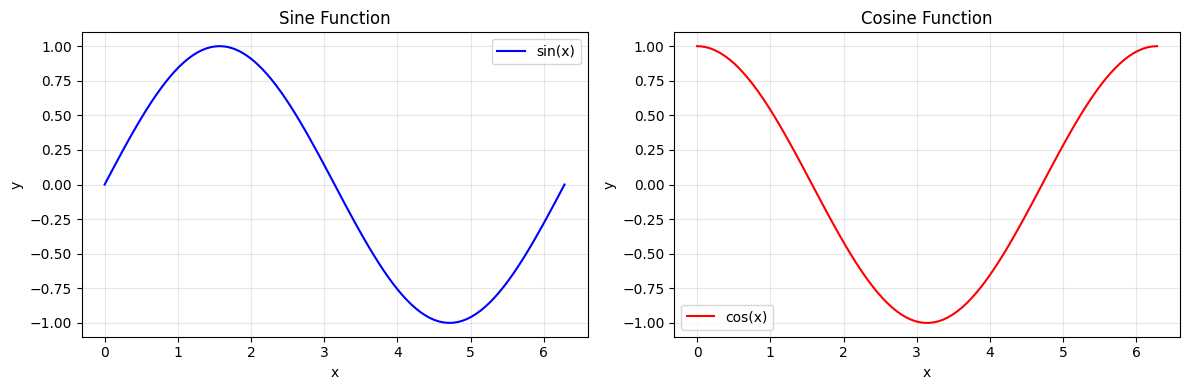
Use plt.subplots() to create multiple plots in one figure:
# Create 1 row, 2 columns of subplots
fig, axes = plt.subplots(1, 2, figsize=(12, 4))

x = np.linspace(0, 2*np.pi, 100)

# First subplot
axes[0].plot(x, np.sin(x), 'b-', label='sin(x)')
axes[0].set_xlabel('x')
axes[0].set_ylabel('y')
axes[0].set_title('Sine Function')
axes[0].legend()
axes[0].grid(True, alpha=0.3)

# Second subplot
axes[1].plot(x, np.cos(x), 'r-', label='cos(x)')
axes[1].set_xlabel('x')
axes[1].set_ylabel('y')
axes[1].set_title('Cosine Function')
axes[1].legend()
axes[1].grid(True, alpha=0.3)

plt.tight_layout()  # Prevent overlap
plt.show()
# 2x2 grid of subplots
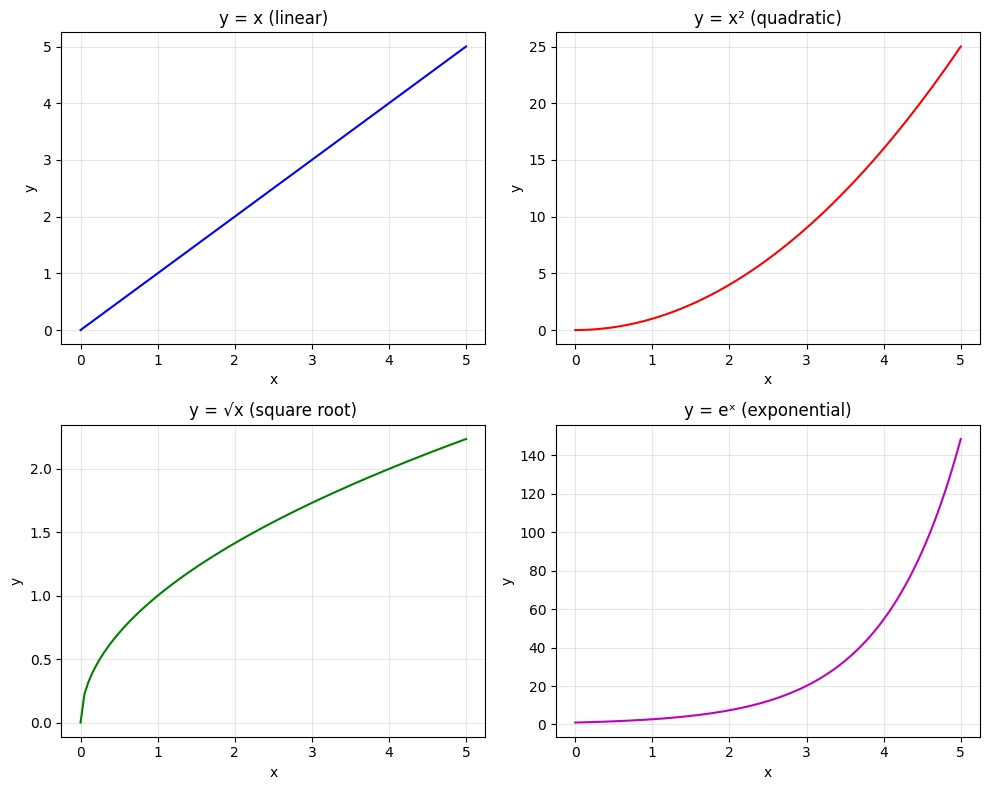
fig, axes = plt.subplots(2, 2, figsize=(10, 8))

x = np.linspace(0, 5, 100)

# Access with [row, col]
axes[0, 0].plot(x, x, 'b-')
axes[0, 0].set_title('y = x (linear)')

axes[0, 1].plot(x, x**2, 'r-')
axes[0, 1].set_title('y = x² (quadratic)')

axes[1, 0].plot(x, np.sqrt(x), 'g-')
axes[1, 0].set_title('y = √x (square root)')

axes[1, 1].plot(x, np.exp(x), 'm-')
axes[1, 1].set_title('y = eˣ (exponential)')

# Add labels to all
for ax in axes.flat:
    ax.set_xlabel('x')
    ax.set_ylabel('y')
    ax.grid(True, alpha=0.3)

plt.tight_layout()
plt.show()
2. Different Plot Types#
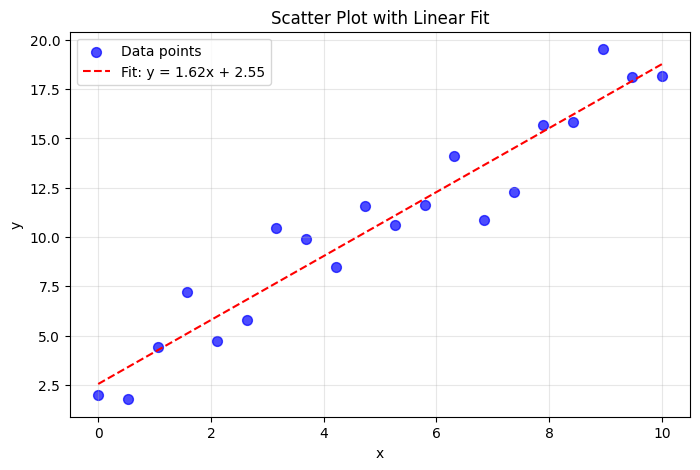
# Scatter plot - good for experimental data
np.random.seed(42)
x = np.linspace(0, 10, 20)
y = 2 * x + 1 + np.random.randn(20) * 2  # Linear with noise

plt.figure(figsize=(8, 5))
plt.scatter(x, y, c='blue', s=50, alpha=0.7, label='Data points')

# Add a fit line
coeffs = np.polyfit(x, y, 1)  # Linear fit
fit_line = np.poly1d(coeffs)
plt.plot(x, fit_line(x), 'r--', label=f'Fit: y = {coeffs[0]:.2f}x + {coeffs[1]:.2f}')

plt.xlabel('x')
plt.ylabel('y')
plt.title('Scatter Plot with Linear Fit')
plt.legend()
plt.grid(True, alpha=0.3)
plt.show()
# Histogram - distribution of data
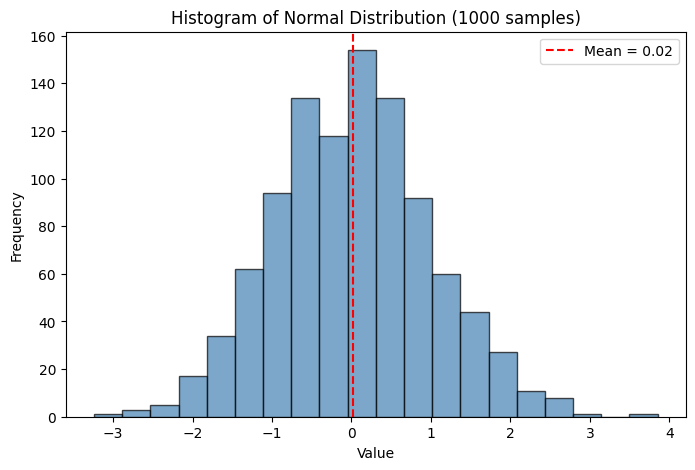
np.random.seed(42)
data = np.random.randn(1000)  # 1000 samples from normal distribution

plt.figure(figsize=(8, 5))
plt.hist(data, bins=20, color='steelblue', edgecolor='black', alpha=0.7)
plt.xlabel('Value')
plt.ylabel('Frequency')
plt.title('Histogram of Normal Distribution (1000 samples)')

# Add mean line
plt.axvline(np.mean(data), color='red', linestyle='--',
            label=f'Mean = {np.mean(data):.2f}')
plt.legend()
plt.show()
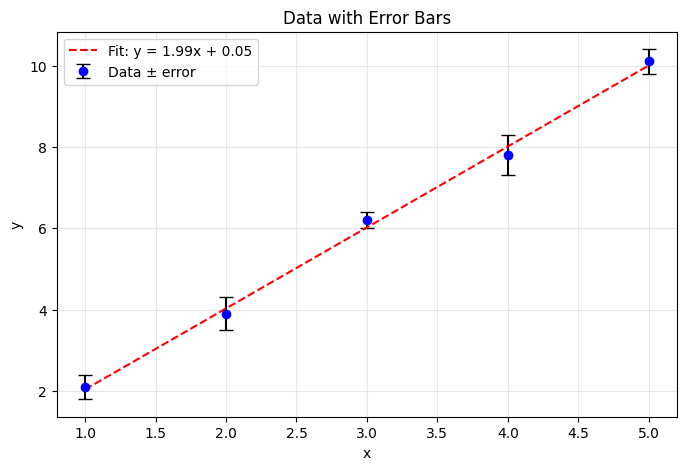
# Error bars - essential for experimental physics!
x = np.array([1, 2, 3, 4, 5])
y = np.array([2.1, 3.9, 6.2, 7.8, 10.1])
yerr = np.array([0.3, 0.4, 0.2, 0.5, 0.3])  # Uncertainties

plt.figure(figsize=(8, 5))
plt.errorbar(x, y, yerr=yerr, fmt='o', capsize=5,
             color='blue', ecolor='black', label='Data ± error')

# Fit line
coeffs = np.polyfit(x, y, 1)
plt.plot(x, np.poly1d(coeffs)(x), 'r--', label=f'Fit: y = {coeffs[0]:.2f}x + {coeffs[1]:.2f}')

plt.xlabel('x')
plt.ylabel('y')
plt.title('Data with Error Bars')
plt.legend()
plt.grid(True, alpha=0.3)
plt.show()
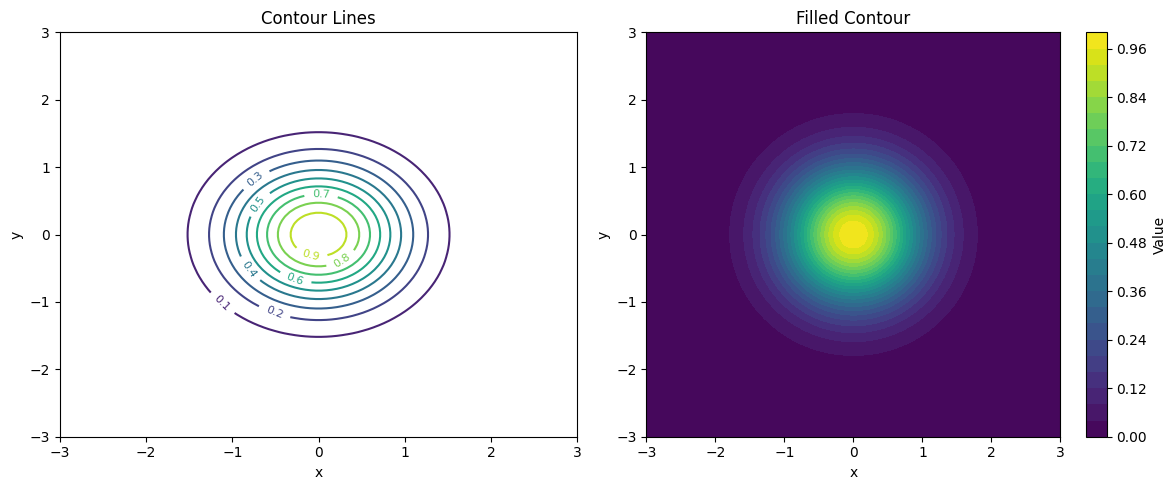
# Contour plot - for 2D data (like potential fields)
x = np.linspace(-3, 3, 100)
y = np.linspace(-3, 3, 100)
X, Y = np.meshgrid(x, y)  # Create 2D grid

# 2D Gaussian
Z = np.exp(-(X**2 + Y**2))

fig, axes = plt.subplots(1, 2, figsize=(12, 5))

# Contour lines
cs1 = axes[0].contour(X, Y, Z, levels=10, cmap='viridis')
axes[0].clabel(cs1, inline=True, fontsize=8)
axes[0].set_title('Contour Lines')
axes[0].set_xlabel('x')
axes[0].set_ylabel('y')

# Filled contour (heatmap)
cs2 = axes[1].contourf(X, Y, Z, levels=30, cmap='viridis')
plt.colorbar(cs2, ax=axes[1], label='Value')
axes[1].set_title('Filled Contour')
axes[1].set_xlabel('x')
axes[1].set_ylabel('y')

plt.tight_layout()
plt.show()
3. Customization#
Make your plots publication-ready:
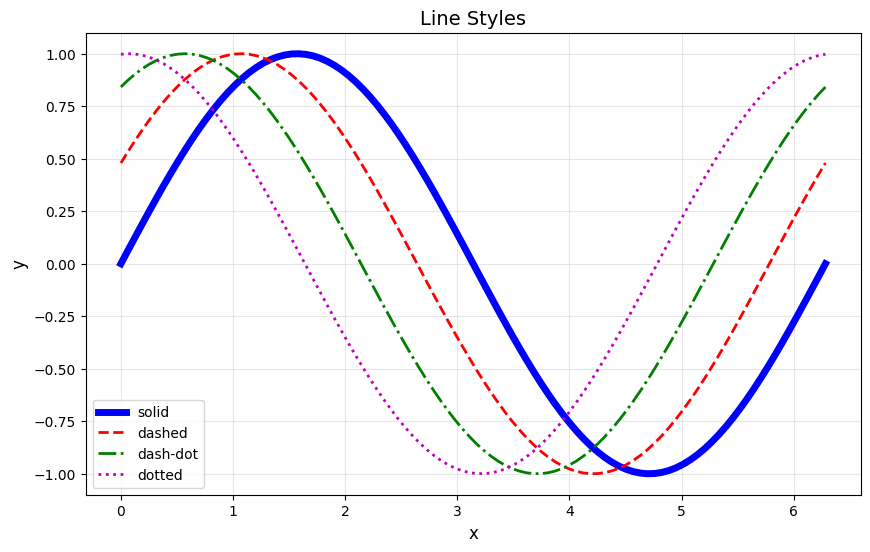
# Line styles and colors
x = np.linspace(0, 2*np.pi, 100)

plt.figure(figsize=(10, 6))

# Different line styles
plt.plot(x, np.sin(x), 'b-', linewidth=5, label='solid')
plt.plot(x, np.sin(x + 0.5), 'r--', linewidth=2, label='dashed')
plt.plot(x, np.sin(x + 1.0), 'g-.', linewidth=2, label='dash-dot')
plt.plot(x, np.sin(x + 1.5), 'm:', linewidth=2, label='dotted')

plt.xlabel('x', fontsize=12)
plt.ylabel('y', fontsize=12)
plt.title('Line Styles', fontsize=14)
plt.legend(fontsize=10)
plt.grid(True, alpha=0.3)
plt.show()
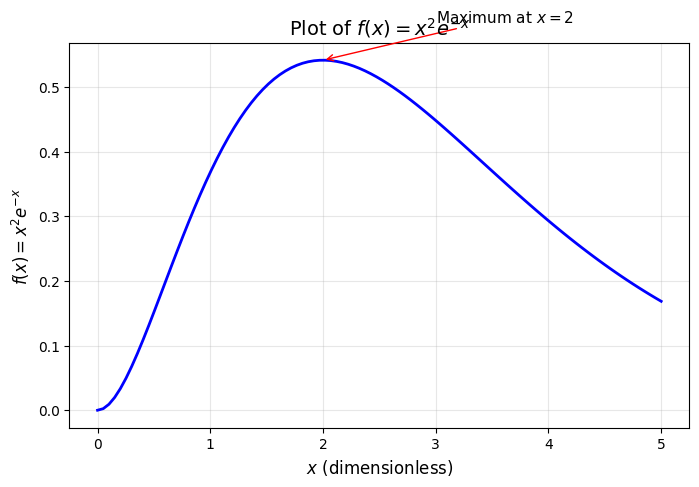
# LaTeX in labels - for proper mathematical notation
x = np.linspace(0, 5, 100)
y = x**2 * np.exp(-x)

plt.figure(figsize=(8, 5))
plt.plot(x, y, 'b-', linewidth=2)

# Use LaTeX notation with r'...' (raw string) and $...$
plt.xlabel(r'$x$ (dimensionless)', fontsize=12)
plt.ylabel(r'$f(x) = x^2 e^{-x}$', fontsize=12)
plt.title(r'Plot of $f(x) = x^2 e^{-x}$', fontsize=14)

# Add annotation with LaTeX
plt.annotate(r'Maximum at $x = 2$',
             xy=(2, 4*np.exp(-2)),
             xytext=(3, 0.6),
             fontsize=11,
             arrowprops=dict(arrowstyle='->', color='red'))

plt.grid(True, alpha=0.3)
plt.show()
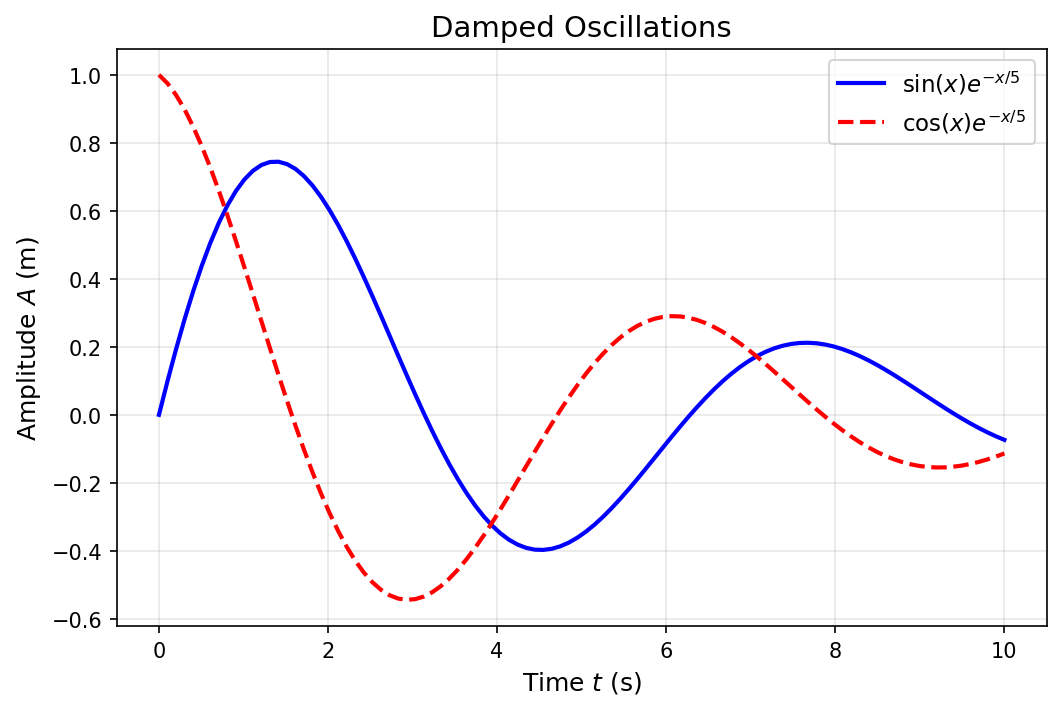
4. Saving Figures#
Save your plots for papers, presentations, and reports:
# Create a publication-quality figure
x = np.linspace(0, 10, 100)
y1 = np.sin(x) * np.exp(-x/5)
y2 = np.cos(x) * np.exp(-x/5)

fig, ax = plt.subplots(figsize=(8, 5), dpi=150)  # High DPI for quality

ax.plot(x, y1, 'b-', linewidth=2, label=r'$\sin(x) e^{-x/5}$')
ax.plot(x, y2, 'r--', linewidth=2, label=r'$\cos(x) e^{-x/5}$')

ax.set_xlabel(r'Time $t$ (s)', fontsize=12)
ax.set_ylabel(r'Amplitude $A$ (m)', fontsize=12)
ax.set_title('Damped Oscillations', fontsize=14)
ax.legend(fontsize=11)
ax.grid(True, alpha=0.3)

# Save in different formats
fig.savefig('damped_oscillation.png', dpi=300, bbox_inches='tight')
fig.savefig('damped_oscillation.pdf', bbox_inches='tight')  # Vector format

print("Saved: damped_oscillation.png and damped_oscillation.pdf")
plt.show()
Saved: damped_oscillation.png and damped_oscillation.pdf
III. Vectorization & Performance#
One of the most important skills in scientific Python is writing vectorized code. This means using NumPy operations instead of Python loops.
Why vectorization matters:
NumPy operations are implemented in C — 10-100x faster than Python loops
Code is shorter and more readable
Essential for large-scale simulations
1. Loop vs Vectorized: Speed Comparison#
import time

# Task: compute sin(x) for 1 million points
n = 1000000
x = np.linspace(0, 2*np.pi, n)

# Method 1: Python loop (SLOW)
start = time.time()
y_loop = []
for val in x:
    y_loop.append(np.sin(val))
y_loop = np.array(y_loop)
loop_time = time.time() - start
print(f"Python loop: {loop_time:.4f} seconds")

# Method 2: Vectorized (FAST)
start = time.time()
y_vec = np.sin(x)
vec_time = time.time() - start
print(f"Vectorized:  {vec_time:.4f} seconds")

print(f"\nSpeedup: {loop_time/vec_time:.1f}x faster!")
Python loop: 1.1931 seconds
Vectorized:  0.0140 seconds

Speedup: 85.3x faster!
2. Vectorization Examples#
Learn to think in arrays, not loops:
# Example 1: Compute kinetic energy for many particles
masses = np.array([1.0, 2.0, 0.5, 1.5, 3.0])      # kg
velocities = np.array([10, 5, 20, 8, 4])          # m/s

# Vectorized: all at once!
kinetic_energies = 0.5 * masses * velocities**2

print("Masses (kg):    ", masses)
print("Velocities (m/s):", velocities)
print("KE (J):         ", kinetic_energies)
print(f"Total KE: {np.sum(kinetic_energies):.1f} J")
Masses (kg):     [1.  2.  0.5 1.5 3. ]
Velocities (m/s): [10  5 20  8  4]
KE (J):          [ 50.  25. 100.  48.  24.]
Total KE: 247.0 J
# Example 2: Distance between all pairs of points
# (This would require nested loops without vectorization)

# 5 particles in 2D
x = np.array([0, 1, 2, 3, 4])
y = np.array([0, 1, 0, 1, 0])

# n = len(x)
# for i in range(5):
#     for j in range(5):
#         dx = x[i] - x[j]
#         dy = y[i] - y[j]
#         distances = np.sqrt(dx**2 + dy**2)

# Compute pairwise distances using broadcasting
# We need to reshape to enable broadcasting
dx = x[:, np.newaxis] - x[np.newaxis, :]  # 5x5 matrix of x-differences
dy = y[:, np.newaxis] - y[np.newaxis, :]  # 5x5 matrix of y-differences
distances = np.sqrt(dx**2 + dy**2)

print("Particle positions:")
for i in range(len(x)):
    print(f"  Particle {i}: ({x[i]}, {y[i]})")

print("\nDistance matrix:")
print(np.round(distances, 2))
Particle positions:
  Particle 0: (0, 0)
  Particle 1: (1, 1)
  Particle 2: (2, 0)
  Particle 3: (3, 1)
  Particle 4: (4, 0)

Distance matrix:
[[0.   1.41 2.   3.16 4.  ]
 [1.41 0.   1.41 2.   3.16]
 [2.   1.41 0.   1.41 2.  ]
 [3.16 2.   1.41 0.   1.41]
 [4.   3.16 2.   1.41 0.  ]]
3. Common Vectorization Patterns#
Loop Version |
Vectorized Version |
|---|---|
|
|
|
|
|
|
|
|
IV. Functions as Arguments#
In Python, functions are first-class objects — they can be passed as arguments to other functions. This is essential for numerical methods!
For example, a numerical integrator needs to know which function to integrate. You pass the function itself as an argument.
1. Passing Functions to Functions#
# A function that takes another function as an argument
def apply_twice(func, x):
    """Apply a function twice: func(func(x))"""
    return func(func(x))

def square(x):
    return x ** 2

def add_one(x):
    return x + 1

# Pass different functions
print(f"square applied twice to 2: {apply_twice(square, 2)}")   # (2²)² = 16
print(f"add_one applied twice to 5: {apply_twice(add_one, 5)}") # 5+1+1 = 7
print(f"np.sin applied twice to π/2: {apply_twice(np.sin, np.pi/2):.4f}")  # sin(sin(π/2))
square applied twice to 2: 16
add_one applied twice to 5: 7
np.sin applied twice to π/2: 0.8415
2. Preview: Numerical Derivative#
This is exactly how we’ll implement numerical differentiation in the next lecture:
def numerical_derivative(f, x, h=1e-5):
    """
    Compute the derivative of f at x using finite difference.

    Parameters:
        f: function to differentiate
        x: point at which to compute derivative
        h: step size (smaller = more accurate, but can cause numerical issues)

    Returns:
        Approximate derivative f'(x)
    """
    return (f(x + h) - f(x)) / h

# Test with known derivatives
print("Testing numerical derivative:")
print(f"d/dx[sin(x)] at x=0: {numerical_derivative(np.sin, 0):.6f} (exact: {np.cos(0)})")
print(f"d/dx[x²] at x=3: {numerical_derivative(lambda x: x**2, 3):.6f} (exact: 6)")
print(f"d/dx[eˣ] at x=1: {numerical_derivative(np.exp, 1):.6f} (exact: {np.exp(1):.6f})")
Testing numerical derivative:
d/dx[sin(x)] at x=0: 1.000000 (exact: 1.0)
d/dx[x²] at x=3: 6.000010 (exact: 6)
d/dx[eˣ] at x=1: 2.718295 (exact: 2.718282)
3. Lambda Functions#
Lambda functions are small, anonymous functions defined in one line. They’re convenient when you need a simple function just once:
# Lambda syntax: lambda arguments: expression

# Instead of:
def square(x):
    return x ** 2

# You can write:
square_lambda = lambda x: x ** 2

print(f"square(5) = {square(5)}")
print(f"square_lambda(5) = {square_lambda(5)}")

# More examples
add = lambda x, y: x + y
print(f"add(3, 4) = {add(3, 4)}")

def addd(x,y):
    return x+y

# Often used inline:
print(f"Derivative of x³ at x=2: {numerical_derivative(lambda x: x**3, 2)}")
# Physics example: Compute derivatives of various potentials

# Harmonic oscillator: V(x) = 0.5 * k * x²
# Gravitational: V(r) = -G*M*m / r
# Lennard-Jones: V(r) = 4ε[(σ/r)¹² - (σ/r)⁶]

k = 1.0  # spring constant
harmonic = lambda x: 0.5 * k * x**2

# Force = -dV/dx
x = 2.0
force = -numerical_derivative(harmonic, x)
print(f"Harmonic potential at x={x}: V = {harmonic(x)}")
print(f"Force at x={x}: F = {force:.4f} (exact: {-k*x})")
Harmonic potential at x=2.0: V = 2.0
Force at x=2.0: F = -2.0000 (exact: -2.0)
V. Physics Applications#
Let’s put everything together with complete physics examples!
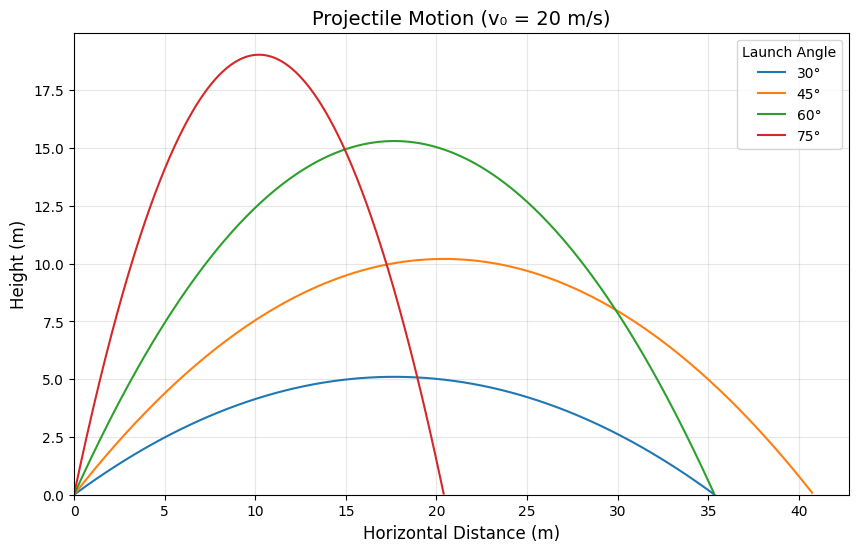
1. Projectile Motion#
Simulate and visualize projectile motion with different launch angles:
def projectile_motion(v0, theta_deg, g=9.8, dt=0.01):
    """
    Simulate projectile motion.

    Parameters:
        v0: initial velocity (m/s)
        theta_deg: launch angle (degrees)
        g: gravitational acceleration (m/s²)
        dt: time step (s)

    Returns:
        t, x, y: time array, x positions, y positions
    """
    theta = np.radians(theta_deg)
    v0x = v0 * np.cos(theta)
    v0y = v0 * np.sin(theta)

    # Time of flight (when y = 0 again)
    t_flight = 2 * v0y / g

    # Create time array
    t = np.arange(0, t_flight, dt)

    # Compute trajectory (vectorized!)
    x = v0x * t
    y = v0y * t - 0.5 * g * t**2

    return t, x, y

# Compare different launch angles
v0 = 20  # m/s
angles = [30, 45, 60, 75]

plt.figure(figsize=(10, 6))

for angle in angles:
    t, x, y = projectile_motion(v0, angle)
    plt.plot(x, y, label=f'{angle}°')

plt.xlabel('Horizontal Distance (m)', fontsize=12)
plt.ylabel('Height (m)', fontsize=12)
plt.title(f'Projectile Motion (v₀ = {v0} m/s)', fontsize=14)
plt.legend(title='Launch Angle')
plt.grid(True, alpha=0.3)
plt.xlim(0, None)
plt.ylim(0, None)
plt.show()
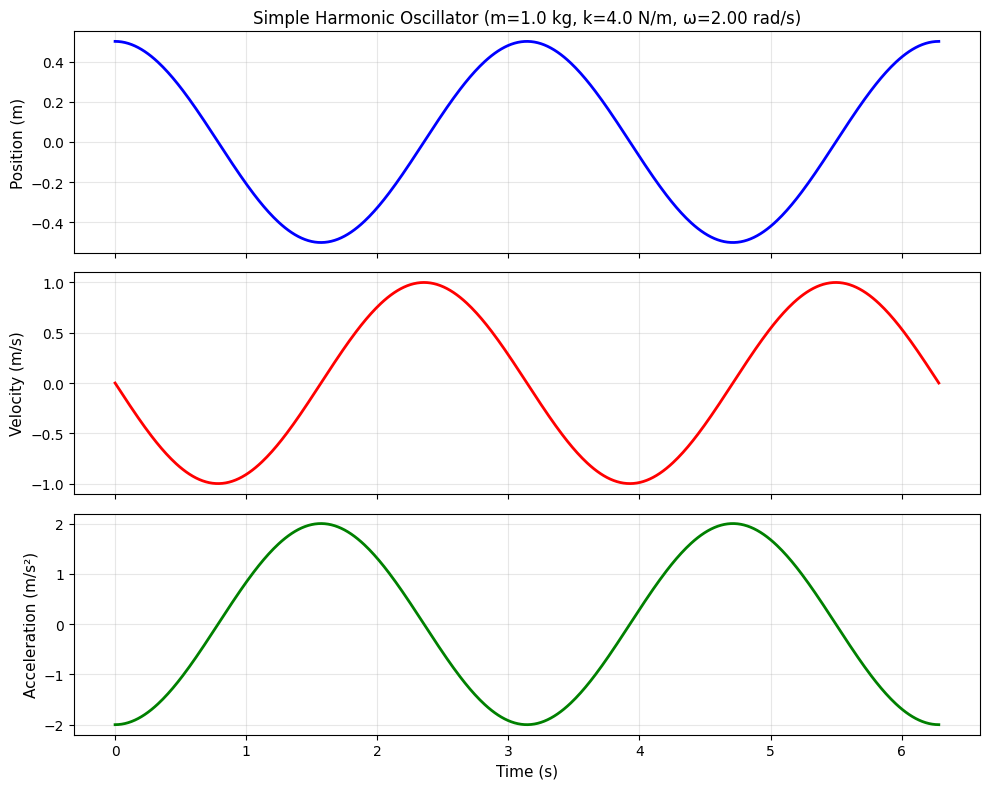
2. Simple Harmonic Oscillator#
A preview of differential equations — the motion of a mass on a spring:
where \(\omega = \sqrt{k/m}\)
def harmonic_oscillator(t, A, omega, phi=0):
    """
    Simple harmonic oscillator solution.

    Parameters:
        t: time array
        A: amplitude
        omega: angular frequency (rad/s)
        phi: phase (rad)

    Returns:
        x: position, v: velocity, a: acceleration
    """
    x = A * np.cos(omega * t + phi)
    v = -A * omega * np.sin(omega * t + phi)
    a = -A * omega**2 * np.cos(omega * t + phi)
    return x, v, a

# Parameters
m = 1.0    # mass (kg)
k = 4.0    # spring constant (N/m)
A = 0.5    # amplitude (m)
omega = np.sqrt(k / m)  # angular frequency

t = np.linspace(0, 4*np.pi/omega, 500)  # 2 complete periods
x, v, a = harmonic_oscillator(t, A, omega)

# Visualization
fig, axes = plt.subplots(3, 1, figsize=(10, 8), sharex=True)

axes[0].plot(t, x, 'b-', linewidth=2)
axes[0].set_ylabel('Position (m)', fontsize=11)
axes[0].set_title(f'Simple Harmonic Oscillator (m={m} kg, k={k} N/m, ω={omega:.2f} rad/s)', fontsize=12)
axes[0].grid(True, alpha=0.3)

axes[1].plot(t, v, 'r-', linewidth=2)
axes[1].set_ylabel('Velocity (m/s)', fontsize=11)
axes[1].grid(True, alpha=0.3)

axes[2].plot(t, a, 'g-', linewidth=2)
axes[2].set_ylabel('Acceleration (m/s²)', fontsize=11)
axes[2].set_xlabel('Time (s)', fontsize=11)
axes[2].grid(True, alpha=0.3)

plt.tight_layout()
plt.show()
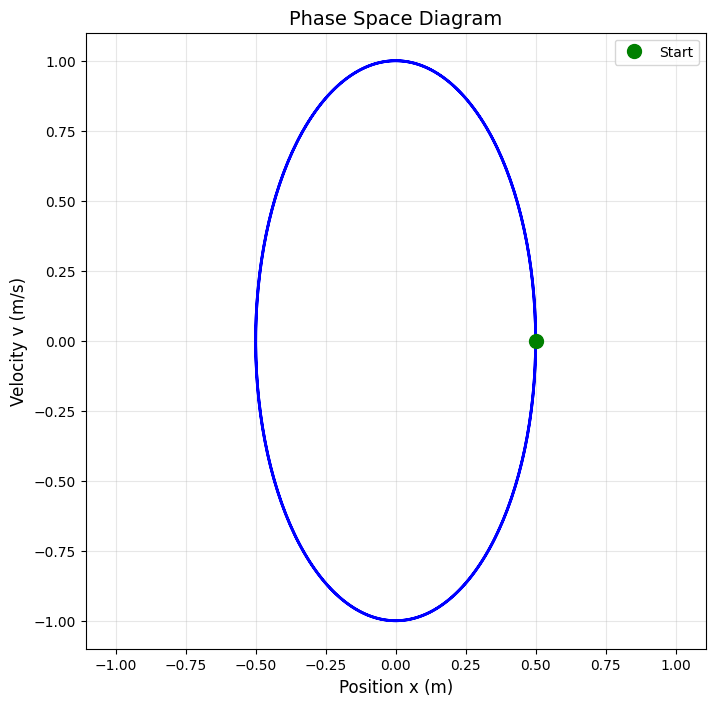
# Phase space diagram (position vs velocity)
plt.figure(figsize=(8, 8))
plt.plot(x, v, 'b-', linewidth=2)
plt.xlabel('Position x (m)', fontsize=12)
plt.ylabel('Velocity v (m/s)', fontsize=12)
plt.title('Phase Space Diagram', fontsize=14)
plt.grid(True, alpha=0.3)
plt.axis('equal')

# Mark the starting point
plt.plot(x[0], v[0], 'go', markersize=10, label='Start')
plt.legend()
plt.show()
# Verify energy conservation
KE = 0.5 * m * v**2           # Kinetic energy
PE = 0.5 * k * x**2           # Potential energy
total_energy = KE + PE

fig, axes = plt.subplots(2, 1, figsize=(10, 6), sharex=True)

axes[0].plot(t, KE, 'r-', label='Kinetic Energy', linewidth=2)
axes[0].plot(t, PE, 'b-', label='Potential Energy', linewidth=2)
axes[0].set_ylabel('Energy (J)', fontsize=11)
axes[0].legend()
axes[0].grid(True, alpha=0.3)
axes[0].set_title('Energy in Simple Harmonic Oscillator', fontsize=12)

axes[1].plot(t, total_energy, 'k-', linewidth=2)
axes[1].set_ylabel('Total Energy (J)', fontsize=11)
axes[1].set_xlabel('Time (s)', fontsize=11)
axes[1].set_ylim([0, 1.1*max(total_energy)])
axes[1].grid(True, alpha=0.3)

plt.tight_layout()
plt.show()

print(f"Total energy varies by: {(max(total_energy)-min(total_energy))/np.mean(total_energy)*100:.2e}%")
print("(Should be constant - variation is due to numerical precision)")
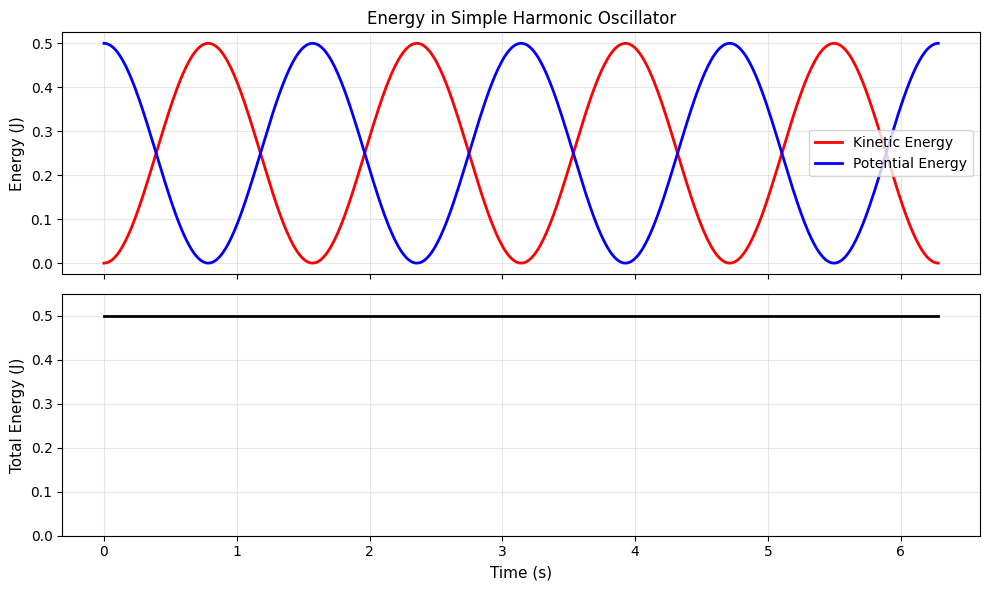
Total energy varies by: 4.44e-14%
(Should be constant - variation is due to numerical precision)
3. Experimental Data Analysis#
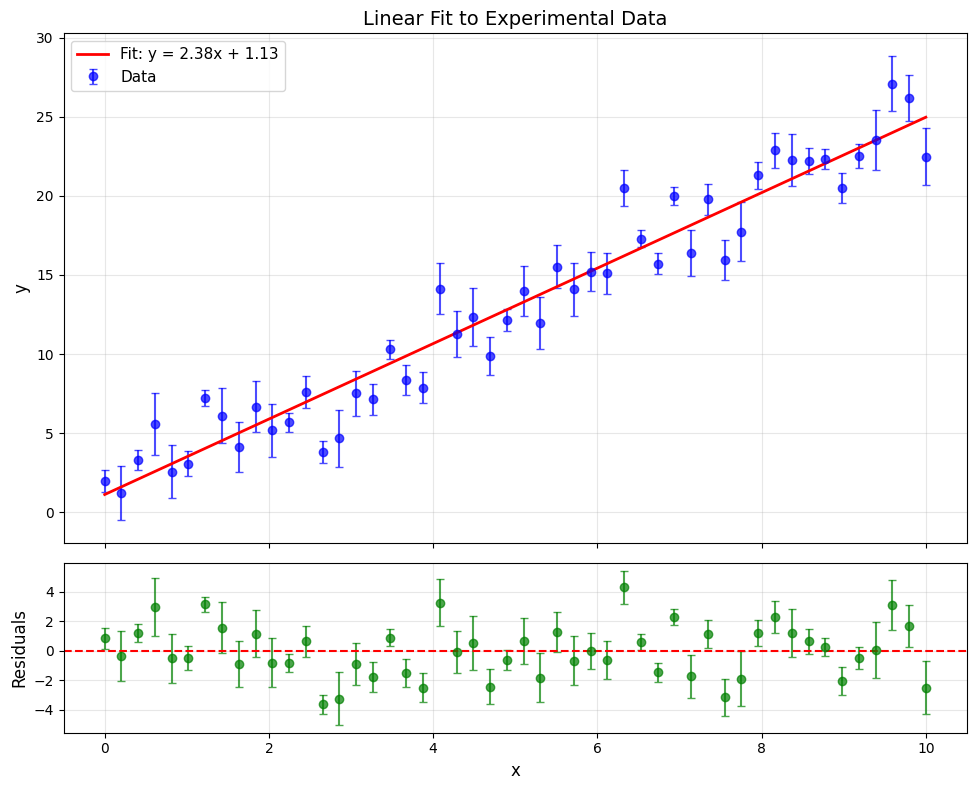
A complete workflow: load data, analyze, visualize, save results.
# Generate synthetic "experimental" data
np.random.seed(42)
n_points = 50

# True relationship: y = 2.5x + 1.0 with noise
x_data = np.linspace(0, 10, n_points)
y_true = 2.5 * x_data + 1.0
y_noise = np.random.normal(0, 2, n_points)
y_data = y_true + y_noise
y_errors = np.random.uniform(0.5, 2.0, n_points)  # Uncertainties

# Save to file
np.savetxt('experiment_data.csv',
           np.column_stack([x_data, y_data, y_errors]),
           delimiter=',',
           header='x,y,y_error',
           comments='')
print("Saved: experiment_data.csv")
Saved: experiment_data.csv
# Load and analyze the data
data = np.loadtxt('experiment_data.csv', delimiter=',', skiprows=1)
x = data[:, 0]
y = data[:, 1]
yerr = data[:, 2]

# Fit a line
coeffs = np.polyfit(x, y, 1)
slope, intercept = coeffs
y_fit = np.poly1d(coeffs)(x)

# Statistics
residuals = y - y_fit
chi_squared = np.sum((residuals / yerr)**2)
dof = len(y) - 2  # degrees of freedom

print("=== Analysis Results ===")
print(f"Slope: {slope:.3f}")
print(f"Intercept: {intercept:.3f}")
print(f"χ²/dof: {chi_squared/dof:.2f}")

# Publication-quality plot
fig, axes = plt.subplots(2, 1, figsize=(10, 8),
                         gridspec_kw={'height_ratios': [3, 1]}, sharex=True)

# Main plot
axes[0].errorbar(x, y, yerr=yerr, fmt='o', capsize=3,
                 color='blue', alpha=0.7, label='Data')
axes[0].plot(x, y_fit, 'r-', linewidth=2,
             label=f'Fit: y = {slope:.2f}x + {intercept:.2f}')
axes[0].set_ylabel('y', fontsize=12)
axes[0].set_title('Linear Fit to Experimental Data', fontsize=14)
axes[0].legend(fontsize=11)
axes[0].grid(True, alpha=0.3)

# Residuals
axes[1].errorbar(x, residuals, yerr=yerr, fmt='o', capsize=3, color='green', alpha=0.7)
axes[1].axhline(y=0, color='r', linestyle='--')
axes[1].set_xlabel('x', fontsize=12)
axes[1].set_ylabel('Residuals', fontsize=12)
axes[1].grid(True, alpha=0.3)

plt.tight_layout()
plt.savefig('analysis_result.png', dpi=300, bbox_inches='tight')
print("\nSaved: analysis_result.png")
plt.show()
=== Analysis Results ===
Slope: 2.384
Intercept: 1.129
χ²/dof: 3.71

Saved: analysis_result.png
VI. Summary#
What We Learned Today#
NumPy Arrays
Creating arrays:
np.array(),np.zeros(),np.linspace(),np.arange()Array operations: element-wise math, broadcasting, universal functions
Indexing: slicing, boolean indexing (filtering)
Methods:
sum(),mean(),std(),min(),max(),diff(),cumsum()
Advanced Matplotlib
Subplots:
plt.subplots(rows, cols)Plot types:
scatter(),hist(),errorbar(),contour()Customization: labels, LaTeX, styles
Saving:
plt.savefig()
Vectorization
NumPy operations are 10-100x faster than Python loops
Think in arrays, not loops
Use boolean indexing for filtering
Functions as Arguments
Functions can be passed to other functions
Lambda functions for quick, anonymous functions
Essential for numerical methods (integration, differentiation, root finding)